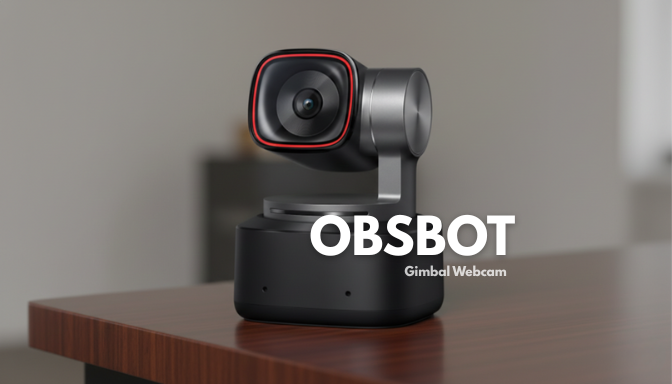

When tech companies say they’re bringing AI to everything, webcams are often the last frontier. But with its lineup of AI-powered gimbal webcams — especially the flagship OBSBOT Tiny 2 and its slightly more affordable sibling OBSBOT Tiny 2 Lite — OBSBOT is asking a big question: What if your webcam could think for itself?
After spending time with the newest generation of OBSBOT gimbal webcams, it’s clear this isn’t just “another Logitech clone.” It’s a platform shift in how webcams behave. Here’s a hands-on, honest look at what works — and what doesn’t.
For busy readers
- OBSBOT’s latest gimbal webcams bring AI-driven auto-tracking, voice and gesture control, and improved imaging, blending hardware and software in new ways.
- They’re compelling for content creators and professionals, but software complexity and price temper the hype.
- Compared to traditional webcams, OBSBOT devices deliver more dynamic framing, smoother movement, and better low-light performance — but they’re not perfect.
What makes OBSBOT’s gimbal webcams stand out
At the center of OBSBOT’s latest devices is a simple idea: a webcam shouldn’t just see you — it should understand and follow you. The gimbal-equipped PTZ (pan/tilt/zoom) mechanism isn’t just decorative. With AI Tracking 2.0, the camera:
- Auto-tracks your movement, keeping you centered even if you lean, pace, or turn.
- Responds to voice commands and gesture controls to change position on the fly.
- Offers modes like Desk View, Whiteboard Mode, and Preset Positions that can automate common framing needs.
These features work together to create a more active video experience — especially useful for creators who move around the frame, educators presenting content, and professionals who want dynamic yet hands-free filming.
What’s new in the latest generation
The current OBSBOT Tiny series (Tiny 3 and Tiny 3 Lite) represents the most refined version yet of this concept:
Improved imaging hardware and AI:
- Larger sensors than previous versions, which means better low-light performance and cleaner details. The Tiny 3 uses a 1/1.28-inch sensor (larger than many webcams).
- Dual-native ISO and HDR, expanding usable dynamic range in diverse lighting.
Advanced audio capture:
- A triple-MEMS mic array aims to improve voice clarity and background suppression — a rare upgrade at this form factor.
Better AI control:
- Voice activation (“Hi, Tiny…”) lets you command the camera to track, switch presets, or sleep.
- AI balancing dynamically equalizes voice and background sounds.
On paper, these are major upgrades — a clear evolution from earlier OBSBOT Tiny and Tiny SE models. Even more importantly, OBSBOT maintains compatibility with major streaming and conferencing platforms out of the box.
Real-world use — what works well
Professional meetings and hybrid work:
Auto-framing and tracking transform a passive camera into an active assistant. No more “Oops, I walked out of frame” moments. It’s especially useful during presentations or long calls.
Content creation and education:
If you’re teaching, vlogging, or recording demos, the camera feels alive — it turns or zooms in when you come forward or raise a hand.
Dynamic lighting and compression workarounds:
While 4K at 30 fps is standard, the True HDR and higher ISO handling mean fewer grainy frames in imperfect room lighting — although real conferencing apps may still compress heavily.
Where the hype doesn’t match reality
Not everything is perfect — and this is where my long-term testing matters:
1. Software complexity
The companion app is powerful but clunky. Features are buried in unintuitive menus, making real-time adjustments harder than ideal.
2. Price vs. perceived gain
At around $349 for the Tiny 3, the value proposition weakens when you compare it with simpler AI-tracking competitors that hit similar “hands-free framing” without the price premium. Reviewers have pointed out that the gains — while real — aren’t always spectacular.
3. Overkill for casual calls
If your primary need is Zoom or Teams calls, the added complexity may be excessive; a regular 1080p webcam still “gets the job done.” But for creators or presenters, the investment makes more sense.
How I’d rate it — from the author’s chair
| Aspect | Rating (out of 10) |
|---|---|
| Image quality | 8.5 |
| AI tracking & smooth motion | 9 |
| Audio capture flexibility | 8 |
| Software/user experience | 6.5 |
| Overall value | 7.5 |
Why these scores?
The hardware ingenuity — especially the motorized gimbal and AI tracking — feels future-ready. The imaging and audio capabilities sit well above many basic webcams, and the software has potential once smoothed out. But clarity and ease of use are lagging behind the hardware promise.
Verdict: Worth the hype?
For creators, educators, streamers, and dynamic presenters, yes — OBSBOT’s new gimbal webcams deserve attention. They push the idea of what a webcam can do. If you want smart camera behavior that follows you, frames automatically, and integrates AI into everyday video work, this is one of the best options available.
For everyday video calls, it’s probably overkill — a powerful tool for a use case most phones and laptops handle fine.
and lastly,
A webcam should be invisible — until it becomes helpful. OBSBOT’s latest gimbal cameras don’t just sit there anymore. They anticipate, adjust, and act — and that makes them exciting, even if the software needs some polish.